


CouponBirds: Deals & Coupons
4.917.00 Reviews
App Specs
- Version
- 1.5.5
- Updated On
- License
- Free
- Downloads
- 100,000+
- Developer
- CouponBirds: Deals & Coupons
- Categories
- Shopping
- Platform
- Android
Screenshots

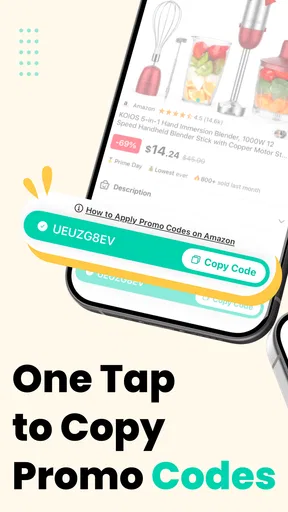





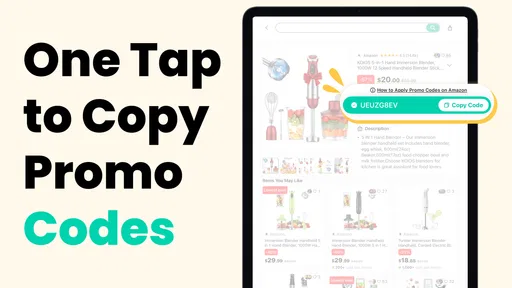
 Analysis by AppCompare
I often think of coupon apps as tools that are most useful when they fit into an existing shopping routine, rather than becoming another chore. That distinction matters in a household, where one person may spot a deal while another is placing the order. CouponBirds: Deals & Coupons is a free shopping app from CouponBirds: Deals & Coupons, built around finding retailer offers and promo codes, including for Amazon and Walmart. I see its clearest role as a shared reference point for checking a discount before checkout, not as a replacement for a family’s normal way of planning purchases.
One device, several shoppers
In a realistic shared-device scenario, someone might be ordering household supplies while another person is comparing prices for a small appliance. The useful habit is to search the retailer or item when the purchase is already being considered, then check whether a listed offer applies before paying. That keeps coupon hunting tied to a real need instead of turning a large discount into a reason to buy something unnecessary.
For a household that takes turns using one phone or tablet, favorites can help keep a promising offer from disappearing into a stream of browser tabs. I would treat saved deals as reminders to check later, not as a shared shopping cart or a record of what another person has bought. The practical boundary is simple: use the app to find a possible saving, then confirm the offer in the retailer’s checkout flow before counting on it.
Keeping shopping accounts separate
A coupon app and a retailer account serve different purposes. CouponBirds can help locate a code, but the person placing the order should still use the appropriate retailer account and payment details for that purchase. On a shared device, I would avoid leaving a retailer signed in if other household members use the same screen, and I would make sure everyone knows which person is responsible for completing the order.
This matters especially when one shopper is researching and another is paying. A code found on the shared device may be useful to both, but that does not mean purchase history, saved payment methods, or account settings should be shared. I find it less confusing to pass along the retailer name and the code or offer details, then let the buyer verify them in their own account.
Coordinating without creating another chore
Alerts for brands or categories can be useful when a household regularly buys from the same retailer, but I would keep them selective. Too many notifications can make a deal app feel like another source of noise, and a discount is only helpful if it arrives at a time when someone actually needs that item. Favorites work better for planned purchases: save a deal while comparing options, then revisit it when the household is ready to buy.
There is also a small but useful coordination lesson here: agree on who checks a deal and who confirms the final price. A displayed coupon is not the same as a guaranteed reduction on every order. Retailer terms, product eligibility, and checkout conditions can affect whether a code works, so the person completing the purchase should verify the total before placing it. That quick handoff is more dependable than assuming a deal will apply because someone else saw it earlier.
Worth Reading Before You Choose

Flipboard Shows What News Apps Must Do Beyond the Feed

Switching to Android Auto Means Rethinking Your Driving Routine

Google Calendar Makes a Crowded Week Easier to Manage

Ludo King Makes the Most of the Minutes Between Plans

Baby Panda World Brings Quick Play to Modern Phones, but Its Game Library Feels Busy

ESPN’s Live Game View Makes Following Close Games Easier
Age, trust, and realistic expectations
The app is rated for Everyone, which makes its intended audience broad, but that rating does not remove the need for ordinary care when children use a shared shopping device. I would show younger family members how to look for a discount without letting a coupon prompt turn into permission to make purchases. The adult responsible for the retailer account should remain in charge of order confirmation and payment.
Trust also means treating coupon listings as options to test, rather than promises. User feedback about whether codes worked can help with judgment, but it cannot guarantee that a code will apply to a different product or order. I would compare the final basket total with the retailer’s price before deciding. If the offer adds steps or nudges the household toward an item it did not need, skipping it is a perfectly sensible choice.
Who benefits most from this approach?
I think the app suits shoppers who already know which retailer or product they want and are willing to spend a short moment checking for a code. It can also help a household coordinate around planned purchases, particularly when one person researches and another completes checkout. The app has a 4.7 average from around 140 ratings, and it has passed 50,000 installs; that gives a new user some context about its audience, though personal results still depend on the offer and retailer.
It is less compelling for someone who expects automatic savings on every purchase, wants a shared family shopping account, or dislikes checking terms at checkout. If a retailer’s own app already offers a clear, reliable discount, using that direct option may be quicker. Likewise, for a purchase where delivery costs or product price matter more than a promo code, I would compare the complete order rather than focus on the coupon alone.
Getting Started with CouponBirds
So, diving straight in, downloading CouponBirds was a breeze. It's available on both Android and iOS, making it super accessible no matter what your device preference is. The installation process was smooth and quick, which is always a plus. Once installed, you're greeted with a clean and user-friendly interface, which, for someone like me who gets easily overwhelmed by clutter, was a refreshing sight.
The Interface and User Experience
Upon opening the app, you're met with a simple layout, which makes navigation a breeze. The home screen features a search bar at the top, allowing you to search for specific brands or categories. Underneath, there's a neat display of trending deals, making it easy to see what’s hot and happening in the world of discounts.
The app doesn’t bombard you with ads, which was a pleasant surprise. It feels like the developers really focused on creating a seamless user experience. It’s all about the deals and coupons, and that’s exactly what you get.
Deals, Coupons, and More Deals
Now, let's talk about the heart of the app: the deals. CouponBirds boasts a wide array of coupons across various categories, from fashion and electronics to groceries and travel. The app claims to update these deals daily, and from my experience, they seem to stay true to their word.
The app also features an "Up to 90% Off" section, which is a treasure trove for bargain hunters. I found some pretty sweet deals here, which is perfect for those looking to save big without spending hours searching.
How Reliable Are the Coupons?
One of my main concerns with any coupon app is the validity of the codes. There's nothing more frustrating than finding a great deal only to discover the coupon doesn't work. Thankfully, CouponBirds seems to have a good track record here. Most of the codes I tried were valid and worked without a hitch at checkout. They also have a feature where users can rate the effectiveness of a coupon, adding an extra layer of reliability.
Features That Stand Out
One feature I particularly liked was the "Favorites" option. You can save deals and coupons for later, which is handy if you’re in a rush but don’t want to miss out. Additionally, the app allows you to set alerts for specific brands or categories, ensuring you never miss a deal.
Another neat feature is the in-app browser. It lets you shop directly through the app, applying coupons at checkout with minimal fuss. This streamlines the shopping process and, in my opinion, enhances the overall experience.
Choosing the right way to check out
The in-app browser makes it convenient to move from a deal to a retailer, especially when I want to keep the search and shopping steps together. Still, I would not assume every retailer’s checkout behaves identically inside a browser. If a code does not appear to apply, I would check the basket total and the retailer’s own terms, then decide whether to continue in the in-app browser or open the retailer’s usual app or site. That extra check is more useful than repeatedly trying the same code without understanding why it was rejected.
Compared with searching the web for coupon codes one by one, a dedicated app can make discovery feel more organized: there is a place to search, browse offers, and keep candidates in Favorites. The trade-off is that no coupon service can make every offer relevant to every basket. For a specific item, I would still compare the retailer’s current price and any automatic promotion with the code found here. A coupon that looks impressive in isolation may not produce the best final total.
Version 1.3.20 is the current release, and the minimum operating-system requirement is 9. It is free to install and carries an Everyone age rating. Those details make it approachable for a wide range of shoppers, but the value is ultimately in how it fits the person’s shopping habits: if you routinely look for promo codes at Amazon, Walmart, or other retailers, it is a handy place to start; if you rarely use codes, a retailer’s own offer may be simpler.
Making a coupon check genuinely useful
My most practical tip is to start with the purchase, not the discount. Search for the retailer or category only after you know what you need, save a relevant offer if you are not buying immediately, and revisit it when you are ready to check out. This reduces the temptation to browse deals just because they are prominent. It also makes Favorites more useful: a short list tied to planned purchases is easier to act on than a collection of offers with no clear purpose.
For a household order, I would also compare the final amount after applying a code with the price before it, including any delivery charge shown by the retailer. If a code is rejected, user ratings can offer a clue about its recent usefulness, but they do not replace checking whether the specific item qualifies. This is where the app’s approach works best: it helps surface a candidate saving, while the shopper makes the final call based on the actual basket.
Where I would draw the line
I would skip CouponBirds if the goal is to automate the entire shopping process or keep several people’s orders and payment details organized in one place. Its useful role is narrower: finding and managing coupon possibilities. It also may not be the fastest route when a retailer already displays a clear discount at checkout, or when I am buying something urgent and do not want to spend time testing codes.
That narrower role is not a flaw so much as a helpful expectation to set. A coupon app can reduce the work of looking, but it cannot remove the need to read offer conditions and verify the final price. Used with that in mind, it complements retailer apps and ordinary web searches rather than replacing them. I would try it for planned purchases and judge it by whether the offers I find actually improve the order I meant to place.
Final Thoughts
In a nutshell, CouponBirds: Deals & Coupons delivers on its promise of making shopping more affordable. It's user-friendly, reliable, and packed with features that make finding and using coupons a breeze. Whether you're a seasoned bargain hunter or just looking to save a few bucks, this app is definitely worth a try. Just download it, dive in, and start saving!
My household verdict is more measured but still positive: I would recommend it to a friend who likes checking for codes before planned purchases and wants a straightforward place to keep offers in view. I would not treat it as a shared family account, a guarantee of savings, or a reason to buy more. Used as a quick check alongside the retailer’s own checkout, it can earn a place in the routine without taking it over.
Pros
- Wide variety of coupons available.
- Easy-to-use interface for quick access.
- Regularly updated with new deals.
- Customizable notifications for offers.
- Seamless integration with multiple stores.
Cons
- Occasional expired coupons listed.
- Requires account for full features.
- Some deals region-specific.
- Ads can be intrusive at times.
- Limited offline functionality.
FAQs for CouponBirds: Deals & Coupons
What is CouponBirds: Deals & Coupons, and how does it work?
CouponBirds: Deals & Coupons is a mobile application designed to help users find and use the latest discount codes and deals from a wide variety of retailers. By aggregating offers in one place, it simplifies the process of saving money while shopping online or in-store. Users can browse by category, store, or search for specific items to find applicable coupons.
Is the CouponBirds app free to use?
Yes, the CouponBirds app is completely free to download and use. There are no hidden fees or subscription costs, making it an accessible tool for anyone looking to save money. Users can enjoy browsing and using available deals without worrying about additional charges.
How often are the coupons and deals updated on CouponBirds?
Coupons and deals on CouponBirds are updated daily to ensure users have access to the latest and most relevant discounts. The app collaborates with various retailers to provide a continuous stream of new offers. Users can also set notifications to stay informed about the latest deals on their favorite stores.
Can I use CouponBirds for both online and in-store shopping?
Yes, CouponBirds offers coupons and deals for both online and in-store shopping experiences. Users can find promo codes for online use and printable coupons or QR codes for in-store purchases. This versatility makes it a comprehensive tool for saving money across different shopping methods.
Is CouponBirds secure in terms of user privacy?
CouponBirds values user privacy and employs standard security measures to protect personal information. The app does not require excessive permissions and focuses on providing a safe browsing experience. Users can review the app’s privacy policy for detailed information on how their data is handled.


